
It goes without saying, every company wants to spend less and maximize profit. One of the main reasons many organizations move to the cloud is precisely the flexibility and cost-efficiency it offers. That’s why, now more than ever, cloud cost optimization has become a top priority. Infrastructure teams are expected to take full advantage of the tools and services the cloud provides to keep spending under control.
AWS gives us several ways to not only reduce costs but also gain visibility and control over them. Among these, AWS Saving Plans stand out as a powerful solution that allows you to cut costs without sacrificing performance or stability, and often without even having to make changes to your infrastructure.
Saving Plans are a practical way to save money: you keep using your services as usual, but with a commitment to a consistent level of usage.
Once enabled, AWS automatically applies discounted rates with these benefits:
No changes to your workloads
No migrations
No added complexity
What Are Saving Plans?
Saving Plans are a flexible pricing model that offer lower rates than standard on-demand pricing, in exchange for committing to a specific hourly spend ($/hour) over a one or three-year term. They apply to compute-related services.
There are three types of Saving Plans:
Compute Saving Plans
EC2 Instance Saving Plans
SageMaker Saving Plans
Depending on the plan, AWS claims you can save up to 72% compared to on-demand prices. Unlike Reserved Instances, you're not locked into a specific instance type. You simply commit to spending a fixed amount per hour, and AWS automatically applies discounted rates to any eligible usage up to that amount. You can run multiple Saving Plans at the same time within one account and even share them across your entire AWS Organization.
When choosing a plan, it will show your current plan details and also provide cost savings available from other plans. AWS will optimize your usage to get you up to that commitment level. This could mean that your use is either greater than or less than the initial commitment.
The AWS service limits and pricing options are updated regularly based on usage patterns of other customers. This keeps costs down for everyone. Even when you only use up 10% of your committed resources.
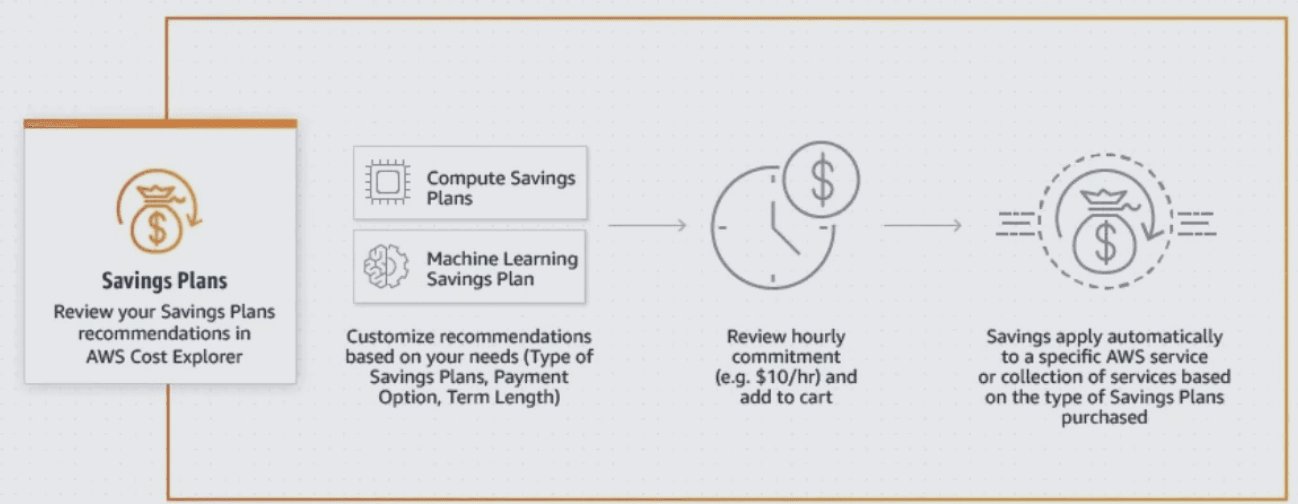
Example: You commit to $5/hour → AWS applies discounted rates to any usage that falls under that threshold. Anything beyond is billed at on-demand rates.
Types of Saving Plans
Compute Saving Plans
These offer the highest flexibility and savings of up to 66%. They apply across EC2 instance families, sizes, AZs, regions, operating systems, and tenancy. They also cover Fargate and Lambda usage. Perfect for mixed environments or evolving architectures.
Example: You could move from a t3.medium in us-east-1 to an m6i.large in us-west-2, or migrate a
microservice from EC2 to Fargate or Lambda—and still benefit from the discount.
EC2 Instance Saving Plans
These provide the deepest discounts, up to 72%, but they’re tied to a specific instance family within a region. You still have flexibility across AZs, OS, size, and tenancy, as long as you stay within the same family and region. Ideal for predictable workloads with minimal variation.
Example: If you have steady workloads on the r6g family in eu-central-1 (Frankfurt), you can switch from r6g.large to r6g.2xlarge, or from Linux to Windows, and continue benefiting from the plan.
SageMaker Saving Plans
If you’re running AI/ML workloads using Amazon SageMaker, there’s a tailored plan for that too. These offer up to 64% savings and full flexibility across instance families, sizes, and regions.
Example: You can train a model on an ml.m5.2xlarge in us-west-2 (Oregon), then switch to an ml.c6g.xlarge in us-west-1 (N. California) and still receive the same discount automatically.

Payment Options
No Upfront
No upfront payment. The total commitment is spread out in equal monthly installments over the selected term. Great for companies that want to avoid large one-time expenses or have short-term cash flow restrictions.
Partial Upfront
You pay around 50% upfront, and the rest in monthly payments. This option typically offers the best balance between cost savings and flexibility, and is often preferred by businesses.
All Upfront
You pay the entire commitment upfront. This offers the maximum possible discount, and is ideal for companies with predictable workloads and available budget.
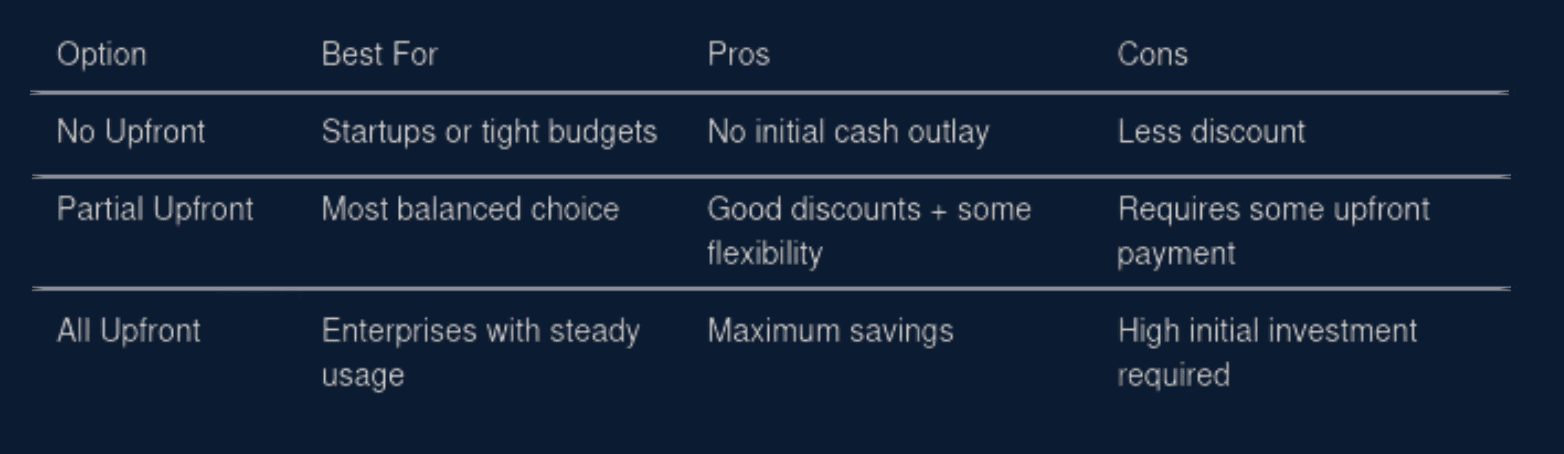
Note: The right payment model depends more on your company’s financial strategy than on your technical architecture.
Strategic Usage
The best way to take full advantage of Saving Plans is using them on real consumption data. It’s not just about saving, it’s about doing it wisely and making sure the plan fits your needs. You can also simulate your coverage using the AWS Savings Plans Recommendations tool, which uses your past usage to suggest optimal commitment levels.
Key tips for using Saving Plans effectively
Analyze your baseline usage
Use AWS Cost Explorer or detailed billing reports to understand your average usage by service, instance type, and region over the past 3–6 months. Look for stable patterns.
Don’t cover 100% of your usage
A good rule of thumb is to commit to 50–70% of your baseline usage. This gives you room to scale or adjust without risking over-commitment.
Choose the right plan for your workload
Got mixed workloads or planning to move to Fargate or Lambda? → Compute SP
Stable, predictable EC2 workloads? → EC2 SP
Running ML models on SageMaker? → SageMaker SP
Start small and scale
Begin with 1-year partial upfront plans. Monitor performance. If your usage stays consistent, consider increasing coverage or moving to 3-year commitments.
Review regularly
AWS provides tools to monitor usage vs. commitment. If you’re consistently under or over your committed amount,adjust your plan accordingly in the next cycle.
Conclusion
As we’ve seen, AWS Saving Plans are one of the cleanest and most effective ways to reduce cloud costs without having to modify your infrastructure, touch your workloads, or add operational complexity. But simply enabling them isn’t enough: you need to analyze, plan, and monitor them to get real value.
When used strategically, Saving Plans can generate sustainable, long-term savings, freeing up budget for innovation, growth, or operational improvements. In a time when tech teams are expected to do more with less, tools like these help turn a high- cost architecture into a cost-smart one. That’s it no instance migration, no manual allocation. Just better pricing.
" width="205px"/></svg>)


